

Marketing collateral rarely slows down because teams lack ideas; it slows down when nobody can find the right file or tell which version is current. Knowing how to streamline marketing collateral management starts with defining what counts as collateral, then giving every asset a clear home, label, owner, and approval path. Collateral includes materials that promote a business, from brochures and flyers to digital images, videos, and social posts.
A well-made asset should be easy to reuse and distribute, but scattered files, unclear responsibilities, and slow approvals can complicate every request. A consistent workflow helps teams create, review, store, update, and share materials with fewer handoffs and less confusion.
This guide explains what marketing collateral does, how centralized asset management supports the work, and how clear request and approval workflows can improve turnaround. It also covers practical ways to keep materials organized and on-brand, and how professionally produced print and display pieces fit into a reliable process.
Key Takeaways
- Marketing collateral spans print and digital materials, so define what your team manages before organizing it.
- Use clear brand, editorial, and style guidelines to keep messaging and visual choices consistent across assets.
- Centralize files with intuitive categories, useful labels, and version controls so teams can find the right materials faster.
- Give each request a defined owner, approval path, and status to reduce confusion and keep work moving.
- Review collateral regularly to identify what to update, reuse, or retire as business needs change.
What is marketing collateral?
Marketing collateral is the print and digital material a business uses to promote its products or services, such as brochures, flyers, images, and social posts. Marketing collateral management is the process of creating, organizing, reviewing, updating, and distributing those materials through clear guidelines and workflows.
Brand guidelines give every asset a shared standard. Messaging rules, editorial guidance, and visual specifications help teams create connected materials, whether a customer sees a brochure, presentation, or social post.
Brand Messaging and Style Guidelines
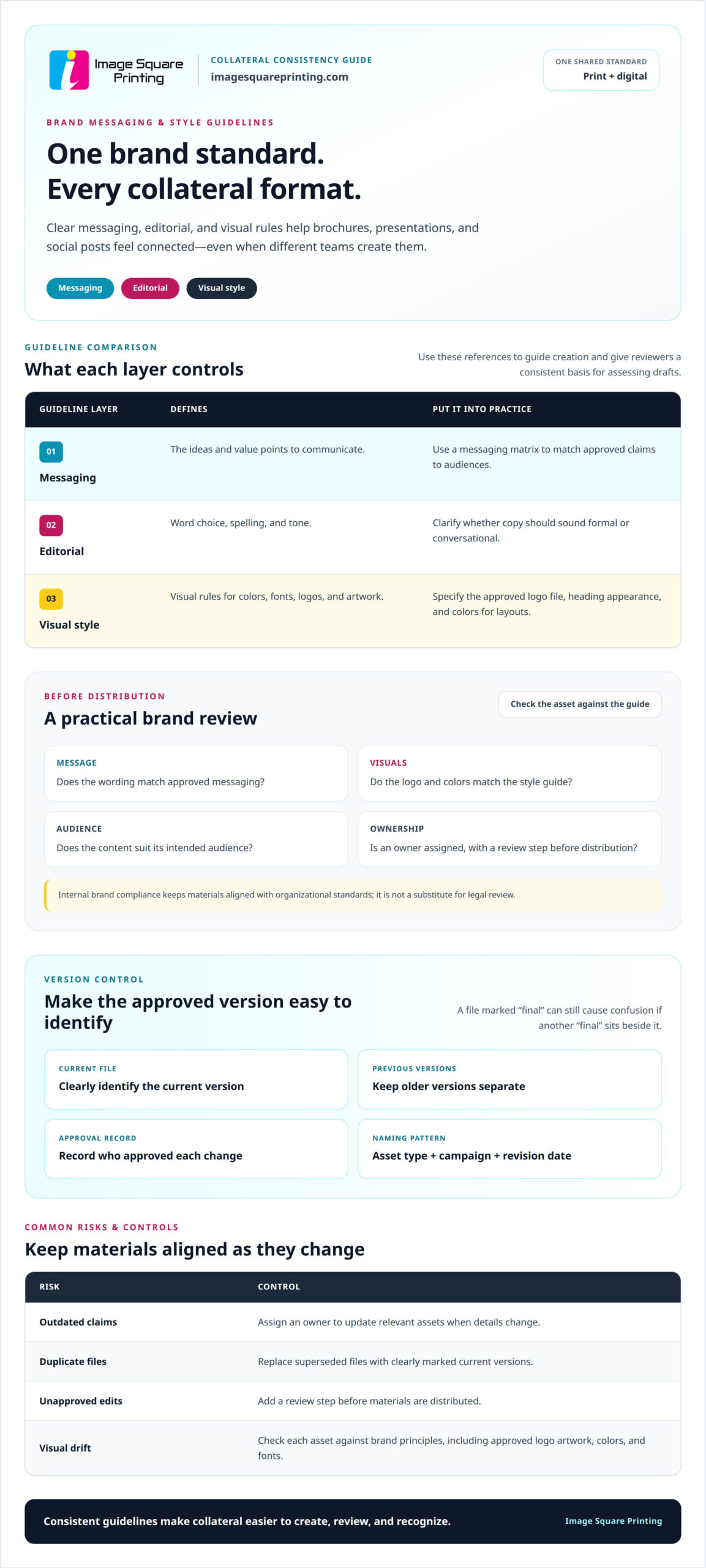
Brand messaging and style guidelines define how an organization communicates across its marketing materials. Messaging identifies the ideas and value points to convey, while editorial standards guide word choice, spelling, and tone. A style guide sets visual rules for elements such as colors, fonts, logos, and artwork.
For example, a messaging matrix can match approved claims to audiences, while an editorial guide clarifies whether copy should sound formal or conversational. Together, these references make creation more efficient and give reviewers a consistent basis for assessing drafts.
Consistent Brand Elements
Consistent brand elements make separate assets recognizable as part of the same organization. A brochure and social image should use approved colors, logo artwork, fonts, and tone, even when different teams create them.
Specify practical details, such as which logo file to use, how headings should look, and which colors belong in a layout. Clear rules reduce visual drift and help marketing materials present a polished, unified identity across channels.
Consistency also means checking each asset against brand principles before distribution. Review the wording against approved messaging, confirm the logo and colors match the style guide, and ensure the content suits its intended audience. Internal brand compliance is not a substitute for legal review; it keeps published materials aligned with the organization’s own standards.
Guidelines work only when employees can use them. Provide a short orientation with examples of approved and outdated materials, then make the current guide easy to find. A new team member preparing a presentation, for example, should know where to find the approved logo, which typefaces to use, and how to adapt language without changing core messages.
Version control protects consistency as materials change. Store a clearly identified current file, keep previous versions separate, and record who approved each change. A file labeled “final” can still cause confusion if another “final” version sits beside it. A consistent naming pattern, such as asset type, campaign, and revision date, helps teams select the right file.
Common risks include outdated claims, inconsistent branding, duplicate files, and unapproved edits. Reduce them by assigning an owner to each asset, adding a review step before distribution, and replacing superseded files with clearly marked current versions. When product details change, for example, the owner can update the relevant brochure and presentation together, then direct teams to the approved copies.
Digital asset management
Digital asset management provides a structured way to store, organize, find, and maintain marketing files. It can hold digital content alongside references to printed materials, making asset access part of everyday marketing workflows.
Organizing and Accessing Files
A digital asset management system gives files a consistent structure, searchable details, and clear access rules. Teams can organize assets by campaign, format, audience, or intended use, then add metadata such as publication status and owner.
For example, sales staff looking for an approved product image can search by campaign or product name instead of scanning email attachments. Descriptive file names and tags make retrieval easier, while permissions help users access the materials they need.
Centralized Asset Management
Centralized asset management brings digital files and information about printed collateral into one shared library. This repository might be cloud storage, a digital asset management platform, or a structured shared folder.
A campaign folder, for instance, can contain approved images, presentation files, print-ready artwork, and related notes. Keeping materials together gives distributed teams a clearer view of available assets and helps prevent duplicate work or recreating an existing item.
Asset Auditing and Categorization
An asset audit inventories existing materials and assesses whether each should be reused, updated, or retired. Categorizing items by format, campaign, audience, and status helps teams understand what they already have before creating more.
A review checklist can flag duplicate files, outdated information, missing ownership, and materials without a clear purpose. After the audit, remove obsolete copies from active folders and label retained assets so users can distinguish approved files from archived ones.
Plan the system around how marketing and business teams already work. A campaign record can connect an asset to its request, audience, owner, approval status, and distribution channel. Where tools support shared links or integrations, connect the library with project tracking, content publishing, and sales workflows. This creates a clear path from request to approved asset without scattering related details across separate documents.
Set access permissions by role. A designer may need working files, while a sales representative may need only approved presentations and product images. Clear permissions reduce accidental edits and help teams use the right asset for each task.
Keep the library useful with routine updates. Assign an owner to review asset status, replace superseded files, and record meaningful changes. For print materials, store the approved artwork and relevant project details alongside digital campaign assets. Teams coordinating those files with printed marketing collateral can keep the library connected to the materials they plan and distribute.
Collateral creation, storage, and distribution workflows
A collateral workflow connects planning, creation, review, storage, and distribution. Set it up by assigning an owner and approver at each stage, then defining clear handoffs and timelines.
A creative brief should identify the audience, goal, and intended distribution channels. Templates and brand guidelines give creators an approved starting point and help avoid unnecessary revisions.
Creation and Approval Workflows
A creation and approval workflow defines each asset’s stages, responsible people, and review points. It makes clear who supplies content, who checks accuracy, and who approves the final design.
For a printed campaign, the sequence might move from concept and copy to stakeholder approval, design review, printer proof, and final approval. Recording status at each handoff shows what is ready and where feedback is still needed.
Templates and Brand Guidelines
Templates are reusable layouts that help teams create materials within established design and branding rules. They save time on recurring work, such as campaign flyers or event announcements, while preserving approved visual elements.
Pair each template with instructions that identify editable fields and required reviews. A local team might update an address or event details, while a central reviewer checks the finished asset before release. This keeps customization focused without requiring the layout to be rebuilt.
Distribution Across Channels and Platforms
Distribution across channels means preparing assets for the places audiences will encounter them, including email, websites, social media, and print. Naming these destinations in the brief helps teams choose the right format and coordinate publication.
For example, an event campaign can combine email announcements with trade show displays. Each channel needs a version suited to its context, while approved messaging stays aligned across the campaign.
Make the brief specific before production begins. Identify the audience, the action the material should support, key messages, and planned placements. A sales presentation for prospective buyers may need different detail from a short social post promoting the same service.
During production, save working files and approved outputs in the digital asset management library. Link each final file to its campaign and channel so team members can find the correct version when scheduling publication or preparing print distribution.
Coordinate publication across platforms with a shared campaign calendar. A website update, for instance, can launch alongside an email and printed handout, with an owner and release status assigned to each channel. This makes timing visible and helps prevent teams from distributing unfinished assets.
After release, record useful feedback and needed updates with the campaign files. If an offer or event detail changes, teams can identify affected assets and route revisions through the same approval process. This record also helps shape the next brief and avoid repeating production work.
Content workflows and request turnaround
A defined request process turns incoming work into clear priorities, assigned tasks, and visible progress. A management system can connect planning, content creation, approval, delivery, and later updates.
Route requests through one intake point, such as a shared project board or marketing software. For each request, capture the target audience, purpose, format, channel, deadline, and approver. A brochure request, for example, should identify where it will be distributed and what action readers should take. Complete details help the team assess the work before production begins.
Assign an owner to each stage and show the next action in the system. A copywriter may draft content, a product lead may review details, and a marketing manager may approve the final file. Set timelines based on complexity and dependencies, then flag blocked work clearly. Requesters can see whether a job needs input, review, or production instead of sending repeated status messages.
Content Maintenance and Lifecycle
Content lifecycle management tracks an asset from its initial request through creation, approval, use, and eventual update or retirement. This keeps materials relevant as products, services, and campaign priorities change.
Give each asset an owner and a review trigger, such as a product update or campaign close. When a product detail changes, the owner can identify affected brochures and digital files, revise them, and route them for approval. Mark replaced content as archived so teams don’t distribute an obsolete version.
Analyzing Content Use and Value
Content analysis connects asset use with its intended purpose, helping teams decide what to improve, reuse, or retire. Track practical signals such as downloads, distribution requests, campaign use, or sales-team feedback.
If a presentation gets repeated requests while another asset goes unused, that pattern can guide future planning. Compare usage with the original goal and channel instead of judging every item by the same measure. A management system that records requests and distribution makes these patterns easier to spot.
Keep planning tied to audience needs and the buyer’s stage. An initial email may introduce a problem, while a later presentation can explain a solution in more detail. Record the intended stage in the request so creators can choose suitable messaging, evidence, and format. This helps teams build useful content rather than assets without a clear role.
Close each project with a brief review of its process and outcome. Note where approvals stalled, which information arrived late, and whether the asset served its intended purpose. If brochure copy repeatedly needs corrections from the product team, for instance, update the intake fields to capture those details earlier. Apply the lesson to the next request to make the workflow more responsive over time.
Marketing collateral management workflows
A reliable workflow connects each collateral request to an approved asset and its intended use. Its value comes from clear handoffs, relevant access, and a centralized view of progress. To streamline marketing collateral management, make the next action visible at every stage, from request intake through distribution.
Start by defining workflow stages and the person accountable at each handoff. A request owner captures the need, a subject expert provides accurate details, and a reviewer approves the finished asset. Keep exceptions visible: if a campaign changes direction, pause affected work and update its status before teams continue using outdated instructions.
Build distinct paths for recurring work and custom projects. A reusable template may suit a routine event announcement, while a new campaign may need more planning and review. Each path should specify required information, decision-makers, and how the final version moves into storage and distribution. This keeps standard work moving without sending every request through unnecessary steps.
Make the workflow easy to follow in a centralized project space. Link the request, working files, feedback, approval record, and final asset in one place. A team member opening a campaign task, for example, should see whether copy is under review, design is underway, or the approved file is ready. This shared view reduces status confusion across marketing and sales.
Set practical handoff rules. Require complete source information before creation starts, gather feedback in one review round where possible, and identify who resolves conflicting comments. For a multi-team campaign, a designated decision-maker can consolidate input before sending revisions back. The workflow should also show when an asset is approved for distribution, rather than leaving that decision buried in messages.
Templates support repeatable strategies, but they need clear limits. Identify which fields teams can customize, which content must remain consistent, and when a revised design needs approval. A local team might update event details in an approved layout, while a central reviewer checks the finished material. This balance supports relevant adaptation without weakening the campaign.
Use reports or dashboards to identify bottlenecks and workload imbalances. Review which stages hold requests, where revisions recur, and which assets are regularly ordered or rarely used. If approval delays cluster around missing product details, adjust intake to capture those details sooner. This evidence helps teams deciding how to streamline marketing collateral management make targeted workflow changes instead of guessing.
Close each project with a brief process review. Record what caused delays, which handoffs worked, and what should change in the next iteration. Apply those findings to workflow rules and templates, then make updates available to everyone involved. For a coordinated print campaign, plan your next print collateral project around the formats, approvals, and distribution needs already defined.
Image Square Printing
Image Square Printing turns approved marketing artwork into physical assets for campaigns, events, and branded spaces. When your workflow calls for a professionally printed piece, the team produces materials such as Retractable Banner Stands and Step and Repeat Backdrops, as well as custom wallpaper printing and custom wall covering.
Bring the intended audience, placement, and approved design into the production conversation. Event materials, for example, need to fit the venue and campaign, while custom wall graphics can extend branding across a physical environment. Clear project details help align the finished piece with your broader collateral strategy.
For professionally printed physical assets, contact Image Square Printing to discuss your project.
Put Your Next Campaign Into Motion
Put your workflow to the test with an upcoming campaign. Define how its physical materials will support the audience experience, from the first impression through the event or branded environment. This practical test can reveal where production details need to connect more closely with your wider marketing process.
For campaigns extending into physical spaces, Image Square Printing offers Retractable Banner Stands, custom wallpaper printing, and custom wall covering. These options extend campaign identity beyond digital channels while keeping creative decisions tied to a clear purpose. A focused project is also a practical way to apply your approach to streamlining marketing collateral management.
Bring your campaign goals and planned materials together for the next step. Contact Image Square Printing to discuss your print project, and move forward with a clear direction for your next campaign.
Frequently Asked Questions
How do you audit and organize existing marketing collateral?
Start by inventorying active and archived assets, then record each item’s format, audience, campaign, owner, approval status, and last review date. Group materials into clear categories such as sales presentations, brochures, event graphics, and digital files. Flag duplicates, outdated claims, and items with unclear ownership for review. Retain useful source files, and archive retired versions so they can’t be mistaken for approved materials.
How do you create a centralized digital asset management system for marketing collateral?
Choose a shared, searchable repository and organize it by asset type, campaign, audience, and status. Add metadata such as content owner, approved use, language, and review date so teams can find the right file without relying on individual folders. For print programs, a corporate portal can centralize artwork and support multi-location ordering through one login, with cost controls to help manage use.
How do you manage versions, permissions, and compliance for marketing materials?
Keep one approved master for each asset, label drafts clearly, and assign editing and approval access by role. Record who approved the material and when, and set a review point for content that may become outdated, such as product details or campaign dates. Customer artwork remains the customer’s property. Image Square Printing uses files to fulfill orders and does not share or reuse them without permission.
How do you measure marketing collateral usage, performance, and ROI?
Track how often each item is requested, downloaded, distributed, or used in a campaign, then connect those records to an outcome such as inquiries, event leads, or sales. Where appropriate, use distinct campaign links or QR codes to help attribute responses to a brochure or printed display. Compare attributable results with production and distribution costs, and revise or retire assets that see little use or generate weak responses.
How do you streamline sales and marketing collateral distribution?
Give sales teams a single approved source for current files, templates, and ordering instructions, then organize materials by audience or sales stage. A corporate printing portal can provide one login, centralized artwork storage, multi-location ordering, and cost controls. Image Square Printing also offers live customer service, with staff who answer the phone by name and assist with complex jobs. Its 20+ years experience supports commercial print projects, including brochures and trade show materials.
Best software for marketing collateral management and pricing
A shared folder, cloud storage, or a digital asset management platform can serve as a collateral repository. Many marketing collateral management solutions have set annual contracts.